
Important Notice
This item is made-to-order exclusively for you once your order is placed. As a result, it is not eligible for cancellation or return under our standard policy. Your statutory rights remain unaffected.
Call 01642 265428
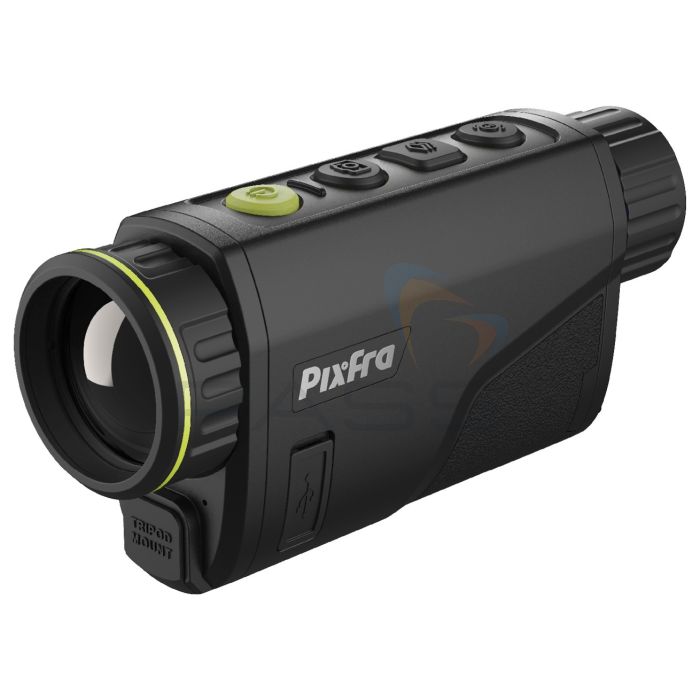
Pixfra Arc PFI-A613 Ecology Thermal Monocular, 13mm Lens

- IR Resolution: 640 x 512px
- 13mm lens with a 32.3° FOV
- 2x rechargeable batteries that each provide 6.5 hours of operating time
SKU
PIX-A613
Pixfra Arc PFI-A613 Ecology Thermal Monocular
The Pixfra Arc PFI-A613 Ecology Thermal Monocular is an infrared-imaging camera optimised for ecology applications. To this end, it features a 640 x 512px IR sensor, < 30 mK thermal sensitivity, and a 13mm lens with a 32.3° field of view ideal for surveying wide areas. Thermal imaging is displayed on the A613’s 1440 x 1080px OLED, full-colour display and can be live-streamed to a smartphone or tablet using the Pixfra app. Supplied with two rechargeable batteries that each provide 6.5 hours of operating time and housed in an IP67-rated aluminium housing, the Pixfra A613 is ideal for outdoor applications.
Key Features
- Thermal monocular optimised for ecology and conservation applications
- IR resolution: 640 x 512px
- < 30 mK thermal sensitivity
- 13mm lens
- Long detection range: up to 670m
- 0.4-inch 1440 x 1080px OLED display
- 6 colour palettes
- Digital zoom
- Built-in video recorder
- 32GB memory
- Compatible with the Pixfra App, enabling streaming to a maximum of 4 smart devices within a 20m radius
- The Pixfra App is available for free on Android and iOS
- Lightweight
- Pocket sized
- Durable
- IP67 (waterproof)
- Robust magnesium alloy housing
- Operating temperature range: -30°C to +50°C
- Replaceable, rechargeable battery
- Battery life: 6.5 hours
- Compact, cost-effective thermal monocular optimised for comfort and convenience
What’s Included?
- Monocular - PIX-PFI-A613
- Ecology Scope
- Rechargeable Lithium-Ion Battery
- Kit - A613-ECOKIT
- As above (PIX-PFI-A613) and including:
- Oxford Black Large Test Equipment Carry Case
- LED Extendable Flashlight / Torch Rechargeable
- LED Head Torch
- Tripod
How to Update the Pixfra Arc 613
To update the Pixfra Arc 613, please follow these simple steps.
Hold down the mode button, then scroll down the list to settings, then scroll down to version and make a note of the original firmware number.
Download the attached zip file and save it on your computer’s desktop. Once unzipped, you can click on the unzipped folder to find the bin file called "TJ_TPC-AX0_MultiLang_V2.630.9992006.0.R.260616.”
Here’s a new download link – https://we.tl/t-LMZGuWtvSYXgRZM5
- Make sure you have a fully charged battery.
- Insert the fully charged Battery into the camera
- Using the supplied USB-C cable, plug it into the camera and into your PC.
- Power on the A613 and you will notice a new USB drive appear (may be called Pixfra, or just USB drive). Open that drive and back up any videos or photos; you must delete all folders in the drive.
- Please copy the new firmware into the empty Pixfra folder.
- Turn off the device.
- Restart the device, and it will prompt you to update it; select ‘Confirm’. You should then see the device updating; this can take a short while. Once this is finished, a normal thermal image will be restored on the unit.
- After this, power the device off again and back on and 'Backup' will be displayed. Leave the device to run, and after approximately one minute, a normal thermal image will return. The process is then complete.
- You can check that the firmware has been correctly updated by entering the device settings and checking that the firmware version V2.630.9992006.0.R.260616 is displayed.
£1,141.62
£1,369.94 inc vat
2 Options in Stock:
Available Next Working Day*
60 Day Returns

Technical Information
Specification
| Thermal Sensor | 640x512, 12μm, <30mK NETD |
|---|---|
| Detector Type | Vanadium oxide uncooled focal plane detector |
| Spectral Range | 8μm~14μm |
| Frame Rate | 50 Hz |
| Objective Lens | 13mm f1.0 |
| Field of View | H: 32.3°; V: 25.8° |
| Detection Range | 670m |
| Magnification | 0.875x |
| Colour Palettes | 6 (white hot/black hot /iron red/ alarm/amber/emerald) |
| Close Focus Distance | 0.5m |
| Digital Zoom | 1x, 2x, 4x, 8x |
| Display Screen Dimensions | 0.41 inch, OLED |
| Screen Resolution | 1440 x 1080 |
| Diopter | -4D ~ +5D |
| Eye Relief | 15mm |
| Uniformity Correction | Auto; Manual |
| Storage | Built-in EMMC (32 GB) |
| Audio Recording | Yes |
| Hot Spot Trace | Yes |
| Wi-Fi | Yes |
| Power Supply | 5 V Type-C |
| Battery Type | 1 rechargeable 1850 Lithium battery |
| Battery Capacity | 3,200 mAh |
| Battery Operating Life | Up to 6.5h |
| Operating Temperature | -30 °C to +60 °C (-22 °F to +140 °F) |
| Storage Temperature | -30 °C to +70 °C (-22 °F to +158 °F) |
| Protection | IP67 |
| Product Dimensions | 151.7 mm x 42.0 mm x 74.4 mm (5.98″ x 1.65″ x 2.93″) (L x W x H) |
| Packaging Dimensions | 227 mm x 150 mm x 132 mm (8.93″ x 5.90″ x 5.19″) (L x W x H) |
| Net Weight | ≤304 g (0.67 lb) (battery excluded) |
Document Downloads
Pixfra Arc Thermal Imaging Monocular - Quick Start Guide
Pixfra Arc Thermal Imaging Monocular - User Manual
Additional Information
SKU
PIX-A613

Pixfra Arc PFI-A613 Ecology Thermal Monocular, 13mm Lens
£1,141.62
£1,369.94 inc vat
£1,141.62
£1,369.94 inc vat